
Your keywords, highlighted on every page.
Highlight multiple words at once on webpages and PDFs.
Save your keywords once. Highlighty colors every match on every page you open.
Add Highlighty to your browserStart with your workflow
See practical ways to search the pages and documents you read every day.
Recruiting and sourcing
Keep role requirements visible while reading candidate profiles and CVs.
See the recruiter workflowLegal document review
Locate names, dates, and defined terms across web pages and PDFs.
See the legal workflowMulti-color highlighter for multiple keywords at once
Highlighty highlights several chosen words or phrases in different colors on supported webpages. The free plan supports up to five active queries per list; PRO also opens PDF Search and allows larger lists.
Where Chrome's built-in Ctrl+F can only chase one string at a time, a multi-keyword search lets you see chosen terms side by side. Compare role requirements on a candidate page, or use PRO PDF Search to locate chosen terms in a CV or contract.
Works in Chrome, Edge, Brave, Opera, and other Chromium-based browsers, plus Firefox 109+. Free to start with X-Ray context on supported webpages; PRO unlocks PDF Search, fuzzy matching, regex, and find across open tabs. Read more about Highlighty as a multi-highlighter or see how to find multiple words on a Chrome page.
User-friendly Interface
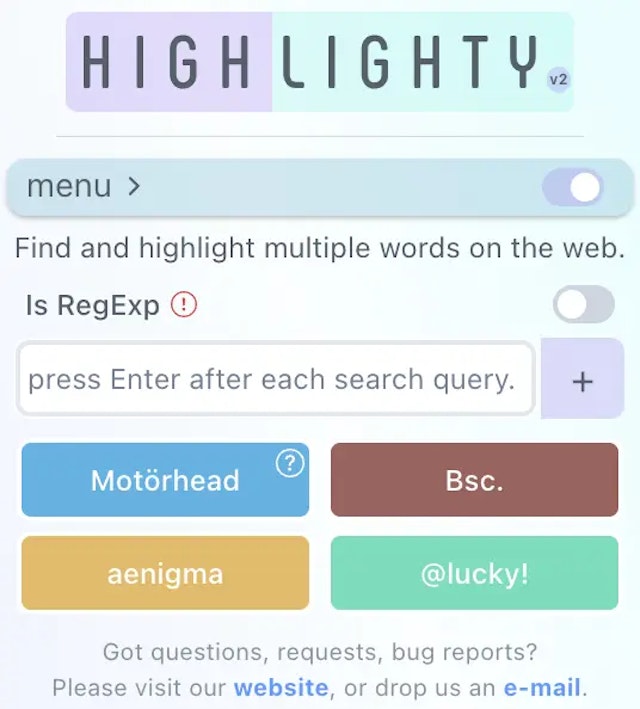
Usability plays a vital role in our design philosophy. We have made a conscious effort to minimize distractions and emphasize what matters most.
A wide range of colors helps you navigate through large amounts of text on long webpages, reports, and searchable PDFs.
We offer you the freedom of choice to pick your favorite colorsfor each query!
Instant results
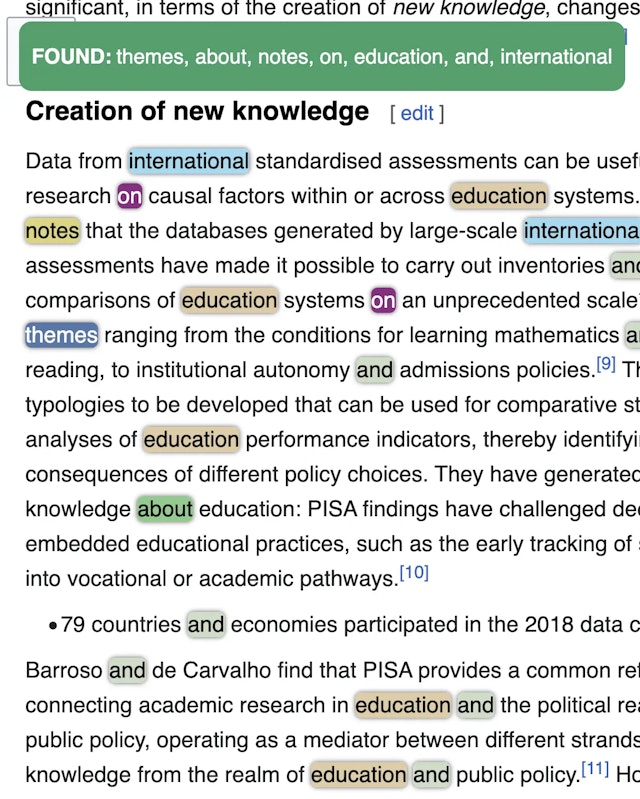
Highlighty notifies you when an open page contains your search terms.
It works for both single and multiple queries, with text color adaptation based on the WCAG 2.0 specification.
Say goodbye to manual text searches on websites; the extension does the work for you automatically and now extends the same workflow into searchable PDFs in Highlighty's PDF Search.
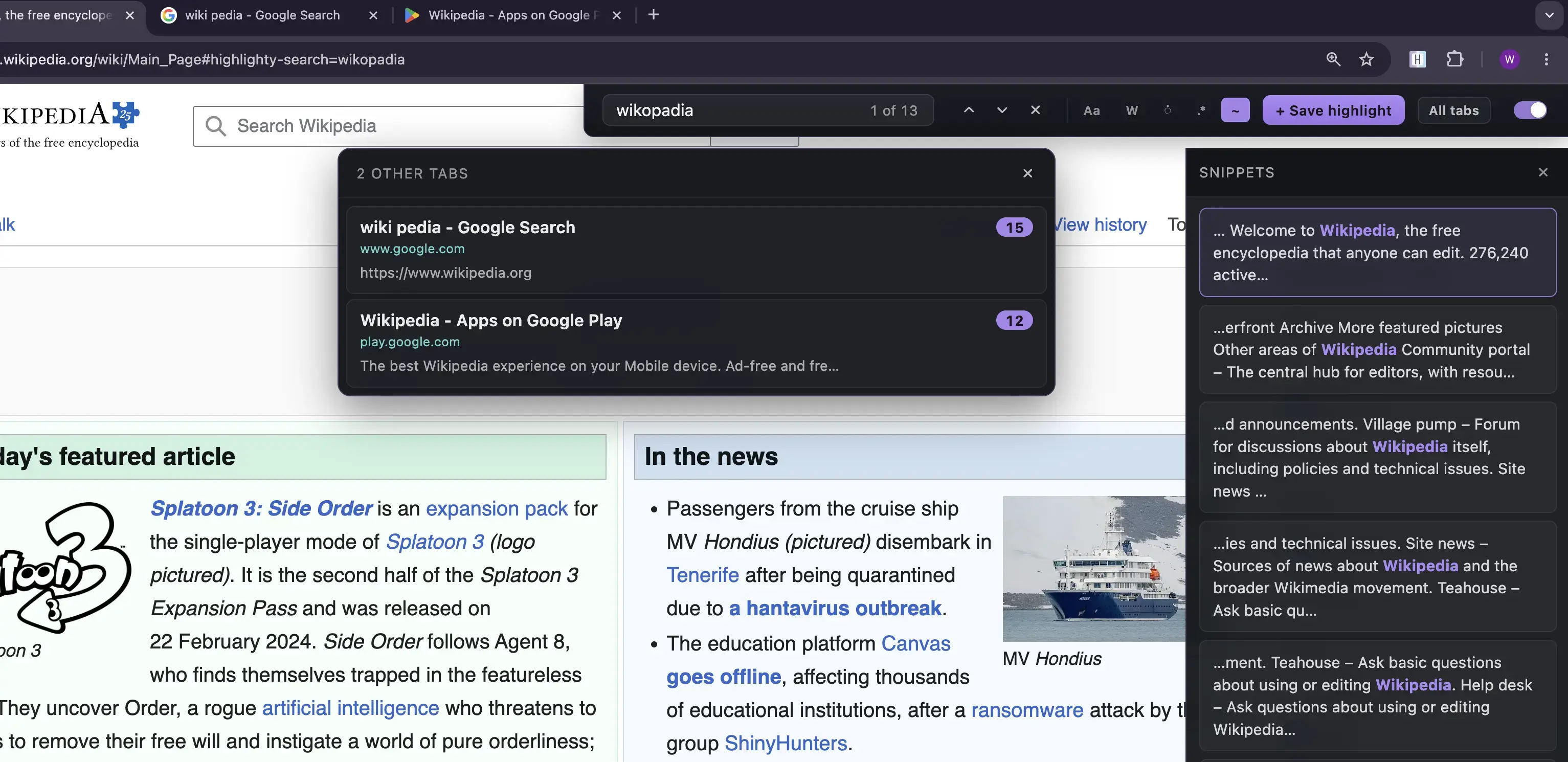
Hit your browser's Find shortcut (⌘F / Ctrl+F) and Highlighty's bar takes over — saved-highlight chips with on-page counts for free, plus PRO power tools: regex pattern matching, fuzzy typo-tolerant search, search history, and find across all open tabs. Double-press to fall through to the native Find whenever you need it. See the full guide.
Keep related PDFs open together in the same PDF Search workspace and reuse the same active query list across them.
If the notifications or highlights become a distraction, you can easily disable them with hotkeys.
Flexible Customization
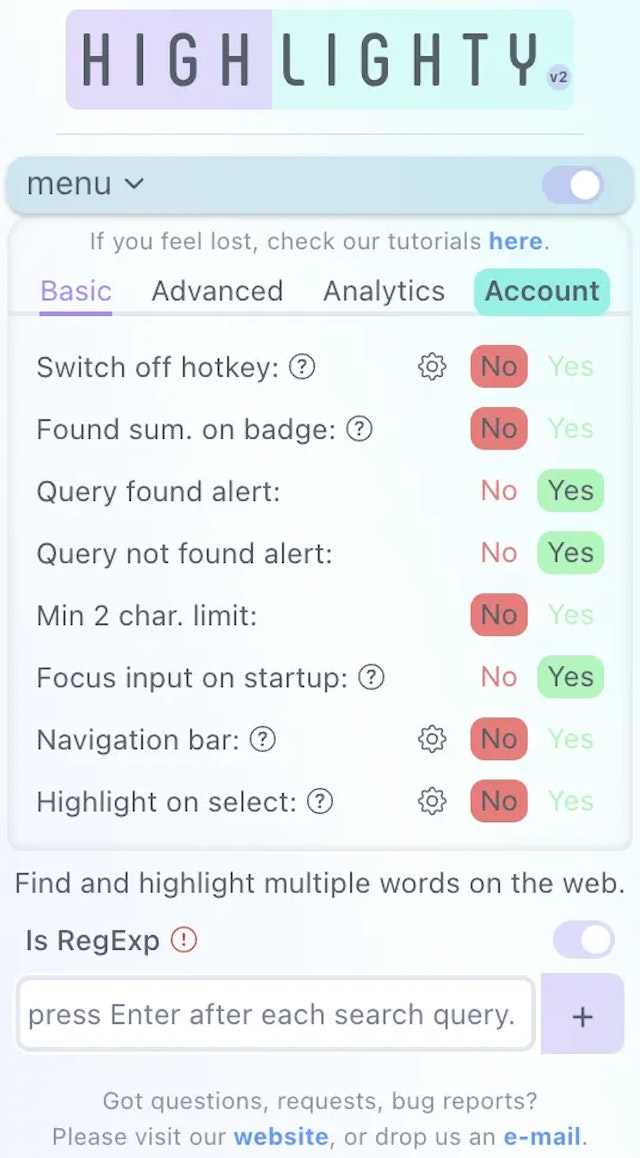
You can fine-tune your searches by adding criteria, adjusting search rules, and tailoring your experience within the extension.
Switch between the Basic and Advanced settings views based on your preference. If you prefer a streamlined experience, stick with the Basic view.
For those interested in Analytics, we also offer a local analytics view with export options to help you review your search activity, while PDF Search brings the same multi-query workflow to CVs, studies, reports, and contracts with a streamlined sidebar that keeps only document-relevant controls.
The choice is yours. Customize and refine the available settings to match your current needs. These options take effect immediately and apply on your next search or refresh.
A better Ctrl+F
Press Ctrl+F (Cmd+F on Mac) once and Highlighty's search bar opens with live highlighting and saved-highlight chips that count matches on the page. On PRO, forgive typos with fuzzy match, write regex patterns, and find a phrase across every tab you have open. Double-press to fall through to your browser's normal Find whenever you need it.
Read the full Cmd+F takeover post.
PDF Search
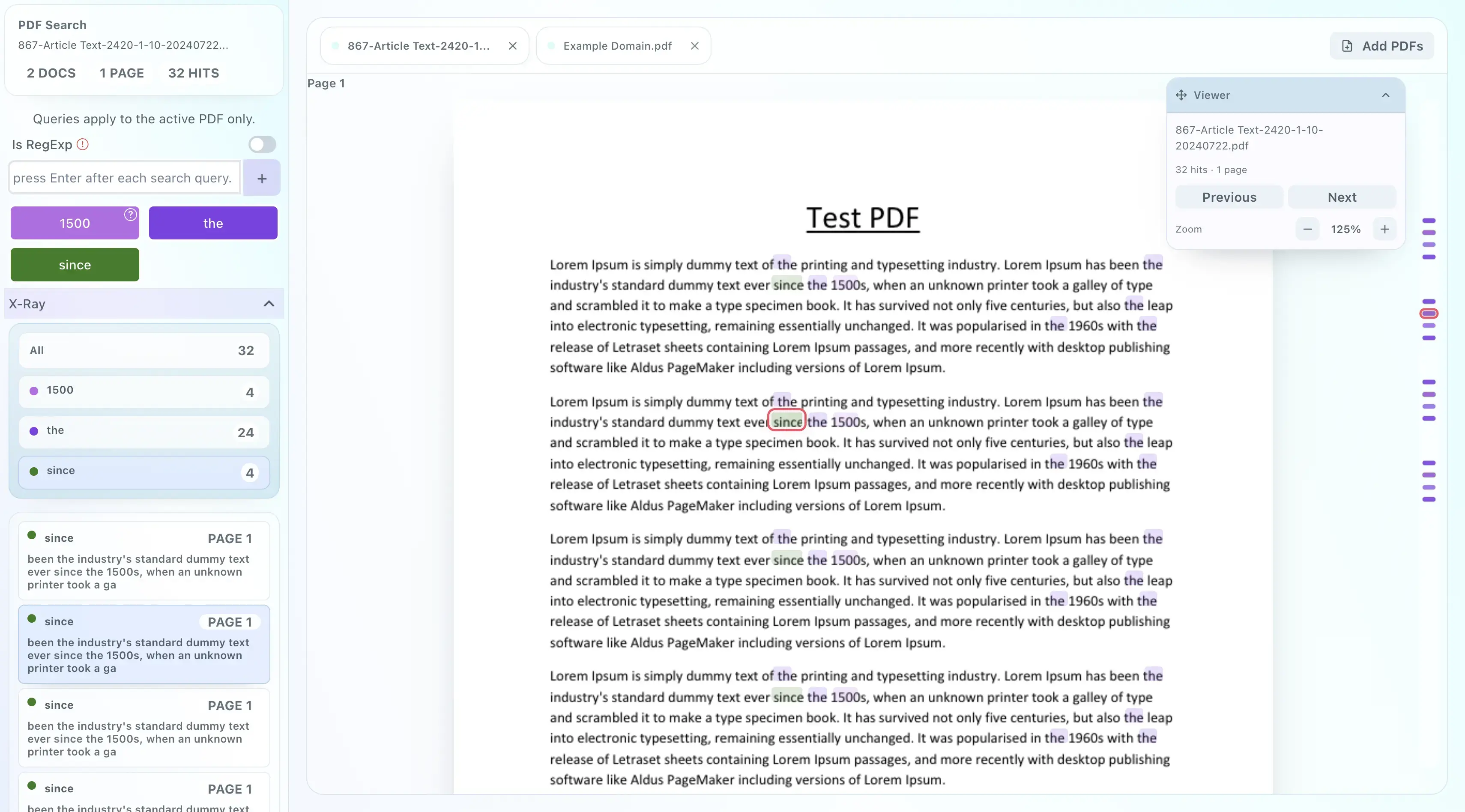
Open searchable PDFs in Highlighty's PDF Search workspace, keep related documents together, reuse the same query list, and review matches with X-Ray, jump navigation, and a sidebar built for focused document reading. Scanned and image-only PDFs are now supported too — Highlighty's on-device OCR reads English-language image pages so they become searchable, with no upload. English only in this first release; other languages will follow.
Useful across many sites 👣
Use Highlighty across forums, email, marketplaces, documentation, and many other text-heavy webpages, then carry the same query lists into searchable PDFs such as CVs, studies, reports, and contracts. PDF Search can keep multiple PDFs open together and also accepts local files by picker or drag and drop. Scanned and image-only English PDFs are read on your device so they become searchable too; password-protected PDFs are still not supported.
Social Media




Gmail

Yahoo!

Outlook
Research

Medium

Wikipedia

Stack Overflow
Forums


Quora

Indie Hackers
News

BBC

Reuters

The NY Times
Marketplaces

Amazon

Aliexpress

Temu
Cloud

AWS

GCP

Microsoft Azure
Code Review

Github

Gitlab

Bitbucket
Give it a try
Install Highlighty and highlight up to five search terms per list for free, without an account. To try advanced workflows such as PDF Search, create an eligible account and verify your email for a 5-day PRO trial. You only start paying when you choose a paid plan.
"It helps my daily work a lot. I can easily find the right skills of our candidates."
- Dóra Forgács,
Head of Recruitment and HR
"A super-productivity tool. One of the extensions that's worth using."
- Andrii Korliuk,
Software Engineer
"Since I'm using it, I do my researches on the web much faster. This extension is a gem!"
- Ákos Zsoldos,
Economic Analyst
Add it to your browser!
Compatible with Mozilla Firefox 109+, Chrome, Edge, Opera, Brave, and other Chromium-based browsers. PDF support ships first on Chromium browsers and expands Highlighty beyond normal webpages.
Click your browser's logo to install the extension from its official store.




Your first steps with us
Step-by-step guides help you install the extension, learn the basics, and start searching faster.
Please download the extension from the Browser Store. Basic highlighting is free, with up to five search terms per list.
Restart your browser or refresh the page you want to search on.
Click on the extension's icon, located in the top-right corner of a supported browser.
Start typing in the word that you are searching for and press Enter. For a PRO trial, open Account, register and verify your email. Eligible accounts get 5 days.
Simple, transparent pricing
Start with free webpage highlighting. Eligible accounts can try PRO for 5 days after email verification to explore PDF Search and multi-document review. Choose a paid plan when you are ready; a trial does not start paid billing automatically.
FREE forever
$0
/month
Use basic highlighting free. Eligible accounts can try PRO for 5 days after email verification.
- Ad-free
- Limited queries to 5
- Find-bar takeover (⌘F / Ctrl+F) with case / whole-word / diacritic modifiers and saved-highlight chips
- Export/import query list
- Query found/not found alert
- Diacritic/case sensitivity
- Minimum 2 character limit
- Focus on extension input
- Navigation bar with custom key settings
- Allowed/disallowed websites
- Compact query list view
- Invert or disable edit and delete clicks on queries
- Color randomizer
PRO
$3.69
/month
Choosing PRO starts billing immediately and ends any remaining trial time.
Renews automatically each month until you cancel; cancel any time in Highlighty's Account tab. Prices exclude VAT or sales tax, which Paddle adds where it applies.
- Ultra-quick support 👨💻
- Unlimited queries
- Unlimited query lists
- RegExp pattern matching for saved searches
- Find-bar takeover (⌘F / Ctrl+F) power tools: regex pattern matching, fuzzy typo-tolerant search, recent-term history, snippets panel, and find across all open tabs
- Searchable local and remote PDFs in Highlighty's PDF Search
- Keep multiple PDFs open in PDF Search and switch between them with shared query lists
- Drag and drop one or more local PDFs directly into PDF Search
- Scanned and image-only English PDFs are read on your device so they become searchable too — no upload, no third-party service. Password-protected PDFs are still not supported
- X-Ray snippets, jump navigation, and custom colors in PDFs
- Search analytics with an infographic and CSV export
- Color picker and palette
- On/off hotkey
- Found queries counter
- Highlight phrases on selection and with a hotkey
- Increase the font size of found queries
- Quick deactivation with hotkeys
Check out more details about pricing and discounts here.
